
What is a POS System? A Complete Guide for Retail & Small Business Owners in India
R.S. Enterprises Team
·
10 January 2026
·
7 min read
What is a POS System?
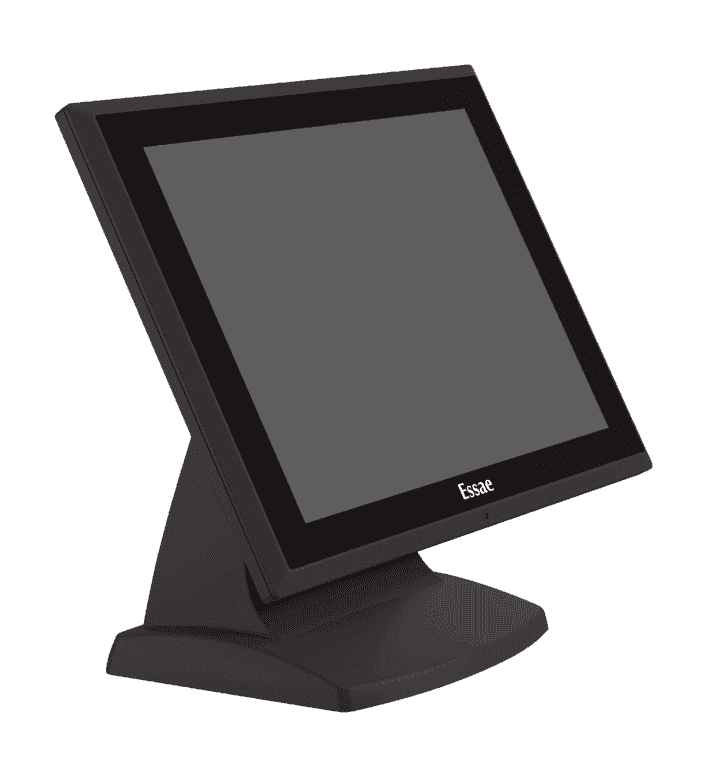
A Point of Sale (POS) system is the combination of hardware and software that processes a retail transaction at the moment a customer makes a purchase. Think of it as a modern, intelligent replacement for the old cash register — one that not only records the sale but also tracks inventory, generates GST-ready bills, accepts multiple payment modes, and gives you detailed business reports.
For retail and small business owners in India, a POS system is no longer a luxury. With GST compliance mandatory, digital payments (UPI, cards) becoming the norm, and customers expecting faster checkout, a POS system is now essential to running a competitive shop.
Core Components of a POS System
A complete POS setup typically includes several hardware components working together:
- POS Terminal (Touch Computer): The central unit — a touchscreen all-in-one computer running your billing software. Examples include the Essae POS 815J (15" TFT LCD, Intel 10th Gen, M.2 NVMe SSD) and the Essae POS 816J (15.6" PCAP touchscreen, faster processing). These terminals are designed specifically for retail environments — fanless design, spill-resistant, and built for 24/7 operation.
- Thermal Receipt Printer: Prints bills instantly without ink cartridges. Models like the Essae PR-65 print at 220mm/sec — fast enough that customers aren't waiting at the counter. Connected via USB or Ethernet to the terminal.
- Cash Drawer: Automatically pops open when a cash payment is processed. The HS-410A cash drawer connects via RJ-11 to the printer and has 5 bill compartments and 8 coin slots — enough for any busy retail counter.
- Barcode Scanner: Scan product barcodes to add items to the bill instantly — no manual entry, no errors.
- Customer Display: A second screen facing the customer showing item names and amounts. The 2x20 Line Customer Display builds trust and reduces billing disputes.
- MSR (Magnetic Stripe Reader): For swiping debit/credit cards directly at the counter.
How a POS Transaction Works — Step by Step
- Customer brings items to the counter. Cashier scans barcodes or enters product codes.
- POS software instantly pulls product name, price, and GST rate from the inventory database.
- Bill total is calculated with CGST/SGST breakdown automatically.
- Customer pays — cash, UPI, or card. POS records the payment method.
- Thermal printer prints the GST-compliant receipt in under 3 seconds. Cash drawer opens if payment is in cash.
- Inventory is automatically decremented. Sales report is updated in real time.
Key Benefits for Small Business and Retail Owners in India
- GST-Ready Billing: Every bill automatically shows CGST/SGST/IGST breakdown with GSTIN — no manual calculations, no compliance headaches.
- Inventory Control: Know exactly what's in stock without manual counting. Get low-stock alerts before you run out.
- Faster Checkout: Barcode scanning and instant pricing means fewer queues and happier customers.
- Multiple Payment Modes: Accept cash, UPI, debit cards, credit cards — all from one counter.
- Business Reports: Daily sales summaries, category-wise reports, peak-hour analysis — all at your fingertips.
- Reduced Errors: No manual price entry means fewer billing mistakes and no disputes.
POS System vs. Billing Machine — Which Should You Choose?
Both serve the same core purpose, but they suit different business sizes:
| Feature | POS System (e.g., Essae 815J) | Billing Machine (e.g., WEP BP-JOY) |
|---|---|---|
| Item Capacity | Unlimited (database-driven) | Up to 1700 items |
| Inventory Tracking | Yes — real-time | Basic |
| Reports | Detailed (sales, stock, staff) | 8–11 report types |
| Staff Logins | Multiple, with permissions | Up to 15 |
| Requires PC | Built-in (all-in-one) | No — fully standalone |
| Best For | Supermarkets, apparel, electronics shops | Kirana stores, small grocery shops |
If your shop has more than 2000 SKUs, multiple staff members, or you need detailed inventory tracking — go for a full POS system. If you run a small kirana or grocery shop and need something simple and affordable that works out of the box — a billing machine like the WEP BP-JOY series is ideal.
Why Buy from R.S. Enterprises?
R.S. Enterprises has been supplying ECR machines and POS systems in Delhi since 2011. As an authorised dealer for Essae and WEP, we offer genuine products, pre-configured setups, and dedicated after-sales support. Our office is located at Laxmi Nagar, New Delhi — easy to reach for demos, installations, and repairs.
We configure each POS system to match your specific workflow before delivery — no generic out-of-box setup. And when something needs repair, our technicians have fast turnaround times.
Related Articles
Need Help Choosing?
Our team at R.S. Enterprises has been helping retail businesses pick the right billing solution since 2011.
Contact Us